
If you are a web developer, QA engineer, or product designer, you already know the frustration of testing user authentication flows. Building a modern web application requires verifying that registration, onboarding, and log-in mechanisms work flawlessly. However, manually testing these pipelines means filling out dozens of form fields, setting up temporary email addresses, waiting for One-Time Passwords (OTPs), and manually copying confirmation codes.
Doing this once or twice is manageable. Doing it fifty times a day while debugging is a productivity killer.
In 2026, the traditional methods of manual form-filling and basic random generators no longer cut it. Modern web applications require sophisticated state handling, seamless integration with temp mail APIs, and the ability to skip past complex authentication hurdles.
In this comprehensive guide, we will explore how to bypass email verification 2026 style, safely automate OTP verification, and leverage advanced browser automation tools to streamline your development lifecycle.
The Core Bottlenecks of Modern Authentication Testing
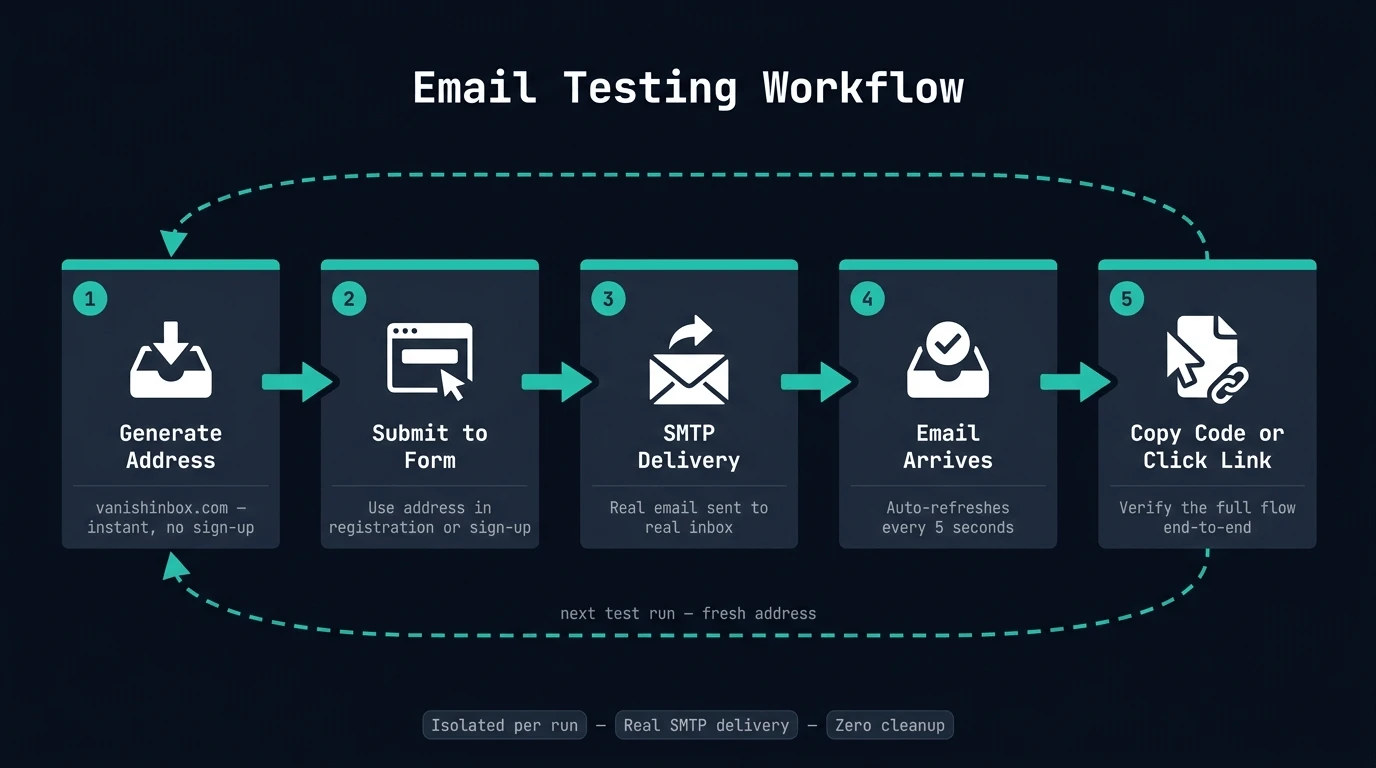
As development cycles shrink, testing authentication flows remains surprisingly slow. Most web apps rely on a multi-stage funnel:
The Form Entry Stage: Inputting a valid first name, last name, secure password, and unique email address.
The Captcha or Bot Protection Gate: Navigating security measures designed to block automated scripts.
The Verification Delivery: Waiting for an SMTP server to deliver a verification link or a 6-digit verification code.
The Code/Link Extraction: Logging into a separate disposable inbox, copying the code, navigating back, and submitting.
For security reasons, many platforms do not allow you to skip these steps in a staging environment without modifying core codebase configurations. What testers truly need is a way to speed up this process from the client side—an auth loop bypass Chrome extension that bridges the gap between form completion and message delivery.
Why Standard Form Fillers Fall Short in 2026
If you've been working in QA for a while, you are likely familiar with legacy browser extensions. Tools like Fake Filler have long been a staple in a developer's toolkit. They do a great job of scattering random text across a page to satisfy basic required-field validations.
However, standard form fillers have a major blind spot: they cannot read or interact with the emails they generate.
When standard tools generate a random email address like johndoe12345@example.com, that inbox doesn't actually exist. As soon as the application triggers its "Check Your Inbox" step, your testing loop hits a wall. You have to manually stop, find a web-based disposable email service, copy a new address, paste it back into the form, wait for the mail, copy the OTP, and manually input it.
To overcome this, modern engineers are moving away from simple generators and adopting platforms that combine form filling with active, live-polling disposable mail services.
The Solution: Introducing the Advanced Signup Tester
The most efficient way to bypass these manual bottlenecks is by deploying a specialized tool designed specifically for registration flows. FakeSignup is a cutting-edge Chrome extension engineered specifically to eliminate friction from the sign-up and authentication testing lifecycle.
Instead of just splashing dummy text across a web page, FakeSignup integrates a highly realistic fast form filler extension with an active, automated disposable email provider system.
Key Features that Power-Up Your QA Workflow:
Zero-API Disposable Inboxes: Instantly provisions actual temporary inboxes on the fly without needing complex developer keys or platform configurations.
Automatic OTP Harvesting: It listens to incoming verification messages in the background, extracts the verification code, and copies it to your clipboard automatically.
Intelligent Autofill Engine: Recognizes name, phone, select menus, and password constraints, injecting valid values that satisfy complex frontend validation checks.
Full Auto Mode: Automatically fills the form, clicks the submit button, waits for the incoming verification mail, and submits the code without you lifting a finger.
Step-by-Step: How to Automate OTP Verification & Form Filling
Let’s walk through how to deploy a modern testing workflow to test signup flow automatically on any web platform.
Step 1: Initialize the Testing Environment
Before starting, download and enable your automation extension. The FakeSignup Chrome Extension is optimized for Chromium-based browsers, making it easy to pin to your browser bar for single-click access.
Step 2: Auto-Generate Context-Aware Form Data
Navigate to your application's signup or registration page. Rather than manually typing in dummy data, trigger your testing extension. Unlike generic fillers that input pure gibberish, an intelligent engine reads the form's HTML tags and attributes, filling:
Realistically formatted names
Valid, strong passwords that pass complex character requirements
A fully functional disposable email for testing that connects to an active inbox
Step 3: Handle the Verification Phase
Submit the form. When your application prompts you for the email verification link or OTP code, the backend of the extension is already listening. It polls the temporary mailbox in the background.
The moment the email arrives, the tool parses the text, isolates the verification code, and copies it to your clipboard. Simply paste the code to complete the login bypass. If you are using Full Auto mode, the extension will input the code directly and submit the verification page automatically.
How to Maximize Efficiency with Advanced Automation Rules
For senior engineers and automation specialists, customizing your form-filling parameters can save even more time. Here are three professional-grade practices to implement:
1. Match Domain Schemas
Sometimes staging environments restrict registrations to specific corporate domains or trusted providers (e.g., only allowing @gmail.com or @yourcompany.com). Make sure to select a temp mail Chrome extension that allows you to specify custom domain rules or select from multiple top disposable mail providers.
2. Configure Success Signposts
In ultra-fast automated environments, you can configure your automation browser context to look for specific "success elements"—such as a welcoming redirect URL or a toast notification—which signals to the test runner that the auth loop bypass was 100% successful.
3. Save Multiple Profiles
If you regularly test distinct user roles (e.g., Admin, Premium User, Free Tier User), configure your filler profiles beforehand. Having profile-specific variables assigned to your automated form filler allows you to jump directly into different application contexts instantly.
Conclusion: Upgrade Your Developer Workflow Today
Manual form entry and clumsy email copying are relics of the past. As we progress through 2026, building and testing software requires workflows that are as optimized as the code itself.
By replacing slow, disjointed testing habits with a unified system that handles form filling, disposable inbox creation, and verification automation all in one spot, you reclaim valuable minutes on every single code deployment.
Ready to completely transform how you test your user flows? Experience the speed of automated auth loops yourself.